
BLIT
Big files, moved fast, proven intact.
A native Mac app for moving large files between SFTP servers, external drives and NAS shares. Every file is checked by SHA-256 at its destination before it gets its real name, and Blit can fetch new downloads from your server as they finish.
Item
Throughput · 60 s
Link data
Log
Warning
Verified, not assumed
Hashed on the server
Blit asks the server for each file's SHA-256 while the file is still in its cache, and hashes its own copy as the bytes arrive. The two have to match before the file gets its real name.
Until then it's a .blitpart. A partly written file never has its final name.
The check runs alongside the download and shows its own progress and time left, whether it runs on the server, on the NAS or as a read-back, so a 70 GB file never shows "verifying" with no progress. For more speed, switch to size checks in Settings; moves still verify by SHA-256.
Hashed on the NAS
Copies to a Synology share are checked by sha256sum on the NAS itself, over SSH, so the result comes from the data on the NAS, not from the Mac's cache.
94% of a 1 GbE link's line rate, every file verified on the NAS.
No silent size-only checks
If a hash is interrupted, Blit doesn't accept a matching size instead. Size-only checks are labelled everywhere they appear, and a move deletes a source only after its copy's hash has matched.
A record of every file
Every file is recorded in the Transfer Log: size, hash, how it was verified, and when. Search it by name or SHA-256, and export it as CSV.
Fast across an ocean
Tuned for a server 148 ms away, where one standard SFTP connection manages about 10 MB/s. Parallel connections, pipelined reads, and a receive buffer bigger than macOS allows by default: 22.5 TB a month in about 4.7 days instead of 24.5.
Measured from the Mac to a server 148 ms away, same server and network for every method. Verification runs alongside the transfer, or can be switched to size checks for more speed.
Resumes anything
Each part file records which byte ranges are on disk. Quit, sleep, lose Wi-Fi, unplug the drive: the queue is kept, and each file continues from where it stopped.
Control the queue
Pause, resume, reorder, cancel, Retry Now. Downloads and drive-to-NAS copies run side by side in separate lanes. When a disk is full, the transfer waits for space instead of failing, and Blit offers to empty that drive's Trash.
Shares reconnect
When the NAS sleeps or the network drops, queued copies wait for the share, then Blit remounts it with the password macOS already saved. You don't see a dialog or need to reconnect it in Finder.
Says why it's slow
The HUD shows the round trip, the route (and warns when traffic goes over Wi-Fi while a cable is plugged in), and says when the server's disk, not the network, is the limit.
New downloads, fetched automatically
Blit watches a folder on your server and copies each download to your drive once it's finished, verified like everything else. You still decide what goes on to the NAS.
Watch a folder
Right-click a folder on your server and choose a destination. Each download is copied once it's finished, verified, and the original stays on the server.
With qBittorrent on the server, Blit reads its own records, so a download stuck at 43% for a month is never taken for finished. With any other client, it waits for the files to stop changing.
Download status
In a folder on your server, each item says how far its download has come and the time left, how long it's been stalled, or how long it's been seeding and at what ratio.
Measured live from the files on the server, not from records an hour old.
Review from the notification
A finished download's notification shows a still from the video, skipping black frames at the start, with Quick Look and Rename buttons. Click it and Blit opens with the file selected.
If an episode is missing from the season, the notification says so, but only after Blit has checked the drive, the NAS and the server.
While you were away
When you're back after a few hours, one notification lists what arrived and whether it's all verified, what's still downloading, and what stalled.
If nothing happened, there's no notification.
The HUD
The rest of Blit is a standard Mac app. Transfer status is shown in a 1-bit pixel-terminal display, styled after 1-bit pixel art and the Nostromo's screens in Alien: black and grey, with muted red only for failures. Every state has a glyph or a word, never color alone.
A native Mac app
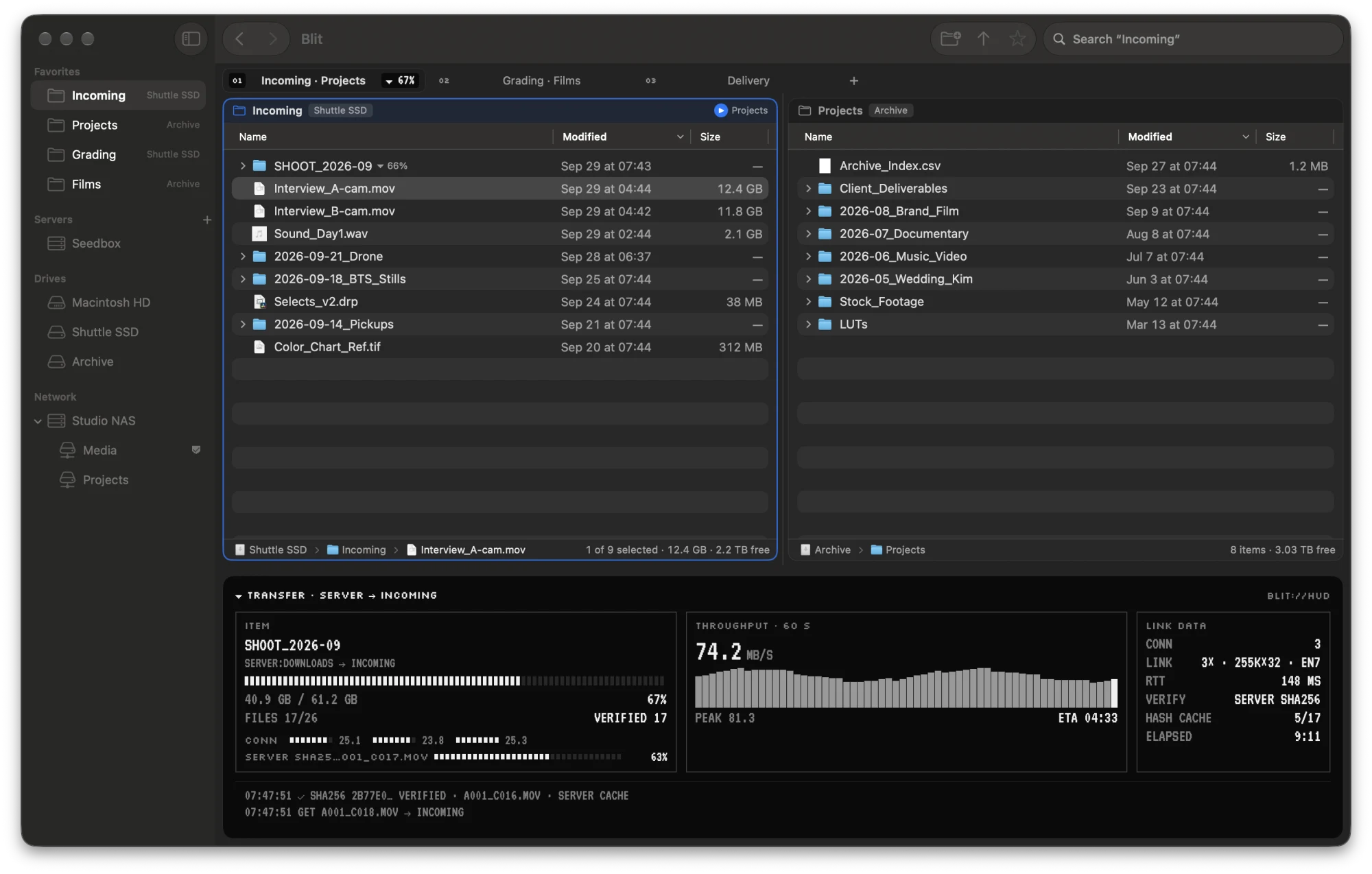
Two panes, in tabs
Where it came from beside where it goes. F5 copies to the other pane, F6 moves, ⌘U swaps them.
Each tab keeps its own pair of folders, and shows the progress of transfers started from it. Tabs are restored when Blit opens.
Finder-style browser
Servers, drives and NAS shares in one sidebar. Newest first, search (⌘F), Get Info, Open With, undo and favorites. Drag from a name to move files, from the date to select, as in Finder.
Quick Look plays what Finder's does, MKV included once QuickLook Video is installed.
Rename N items
Replace, add or format names in bulk, with a live preview, multi-step rules and presets for your naming conventions.
Copy to / Move to
Send reviewed files to a NAS folder without dragging. A move removes each file only once its copy is verified.
Already there? Blit asks: Replace, Keep Both, Skip or Stop.
Files where they go
Blit remembers where a show's last episode or a 4K movie went, and offers that folder: Move to “Season 29”, or ⇧F6. A new season gets its folder beside the last.
Compare Panes
⌃⌘C marks every file against the other pane: only here, the same, verified there, or different. Useful as a check before a move.
Import your servers
Import your servers from Transmit or ForkLift in one step. Measure… finds the number of connections that is fastest for each server.
In the menu bar
Time left, at a fixed width so other menu bar items don't shift, while the arrow's tray fills. A download and a NAS copy at once show as two lines, one per lane.
A failure leaves a red until you've seen it. The Mac stays awake while Blit works.
Detailed notifications
Copied to Movies · 71.6 GB · verified on the NAS · 11 min at 108 MB/s.
Show in Finder when it's done, Show Details when something went wrong.
Empty a drive's Trash
Deleted files keep their space until the Trash is emptied. Empty one drive's Trash from the sidebar, or from a transfer waiting for space.
The HUD opens and closes itself
The full HUD opens when a transfer starts, if the window has room for it, and collapses to the strip once everything has verified. It stays open while something needs your attention.
Automatic updates
Signed updates, checked once a day and installed in a click from Blit › Check for Updates.
Spec sheet
| Platform | macOS 27, Apple silicon. SwiftUI and AppKit, following the Human Interface Guidelines. |
| Transport | SwiftNIO SSH with Blit's own pipelined SFTP v3 client. Password or ed25519 / ECDSA keys, stored in the Keychain. |
| Verification | SHA-256 on the server (with a hash cache), on the NAS, or by read-back, labelled by strength. |
| Resume | Byte-range state beside each part file, a durable queue, and retries with backoff. |
| Watch mode | Looks every 1, 2, 5 or 15 minutes. Reads qBittorrent's records over SFTP; any other client by its files. |
| Preview | The system's Quick Look, including formats that Media Extensions add (QuickLook Video: MKV, WebM, AVI). |
| Updates | Sparkle, with EdDSA-signed releases, checked daily (or off in Settings). |
| Trust | Host keys pinned, known_hosts honoured (hashed entries too), and a changed key refused. |
| Privacy | No accounts, analytics or telemetry. Blit talks only to your servers, NAS and drives, plus a daily update check. |
| Distribution | Developer ID, notarized by Apple. Sold directly, one-time, through Lemon Squeezy. |
Price
- 7-day free trial on each Mac, everything included
- After it, transfers already queued still finish, and browsing and file management keep working
- 30-day refunds, no questions asked
- Updates to Blit 1.x included